Everything a technical evaluator or self-hoster needs: how the three sub-stacks fit together, the auth model, the data model, the two-layer report API, the CLI, and how to run your own instance.
01
Overview & design principles
TellUs is a platform-agnostic visual feedback widget. A non-technical reviewer opens a client site with a single activation link, clicks elements, types notes, and submits. Feedback is captured as structured, machine-readable data your AI coding agent can act on directly — without a clarification round-trip.
The project ships as three independent sub-stacks: a vanilla-JS widget bundle, a procedural PHP API, and a vanilla-JS dashboard SPA. They share no framework, no monorepo tooling, and no build step beyond the widget's esbuild compilation.
Five design principles
principle · 01
The Jan Test
A 60-year-old non-technical client must submit her first note within 60 seconds of clicking an activation link, with zero instruction. This is a hard rejection criterion — not a goal. UX decisions are evaluated against it first.
principle · 02
Agent-First Data
Every note captures enough structured context for a coding agent to locate the element in source and execute the change without followup: CSS selector, XPath, computed styles, bounding box, and the reviewer's replacement text.
principle · 03
Progressive Enhancement
Core workflow is four gestures. Screenshot and voice are each one optional extra click. Agents reading Layer 1 summaries never need to touch Layer 2 detail unless a note is ambiguous.
principle · 04
Zero Footprint When Inactive
No widget code executes for normal visitors. The embed script is entirely dormant until ?tellus= appears in the URL. There is nothing to block, load, or observe for production traffic.
principle · 05
Platform Agnostic
Works on WordPress, Wix, Squarespace, Webflow, static HTML, Next.js, Shopify, localhost, staging, and production — any environment that can serve a <script> tag.
02
Architecture
Three sub-stacks; no monorepo tooling. The root package.json owns test tooling (Playwright) only. Key architectural decisions are recorded as ADRs in docs/adr/.
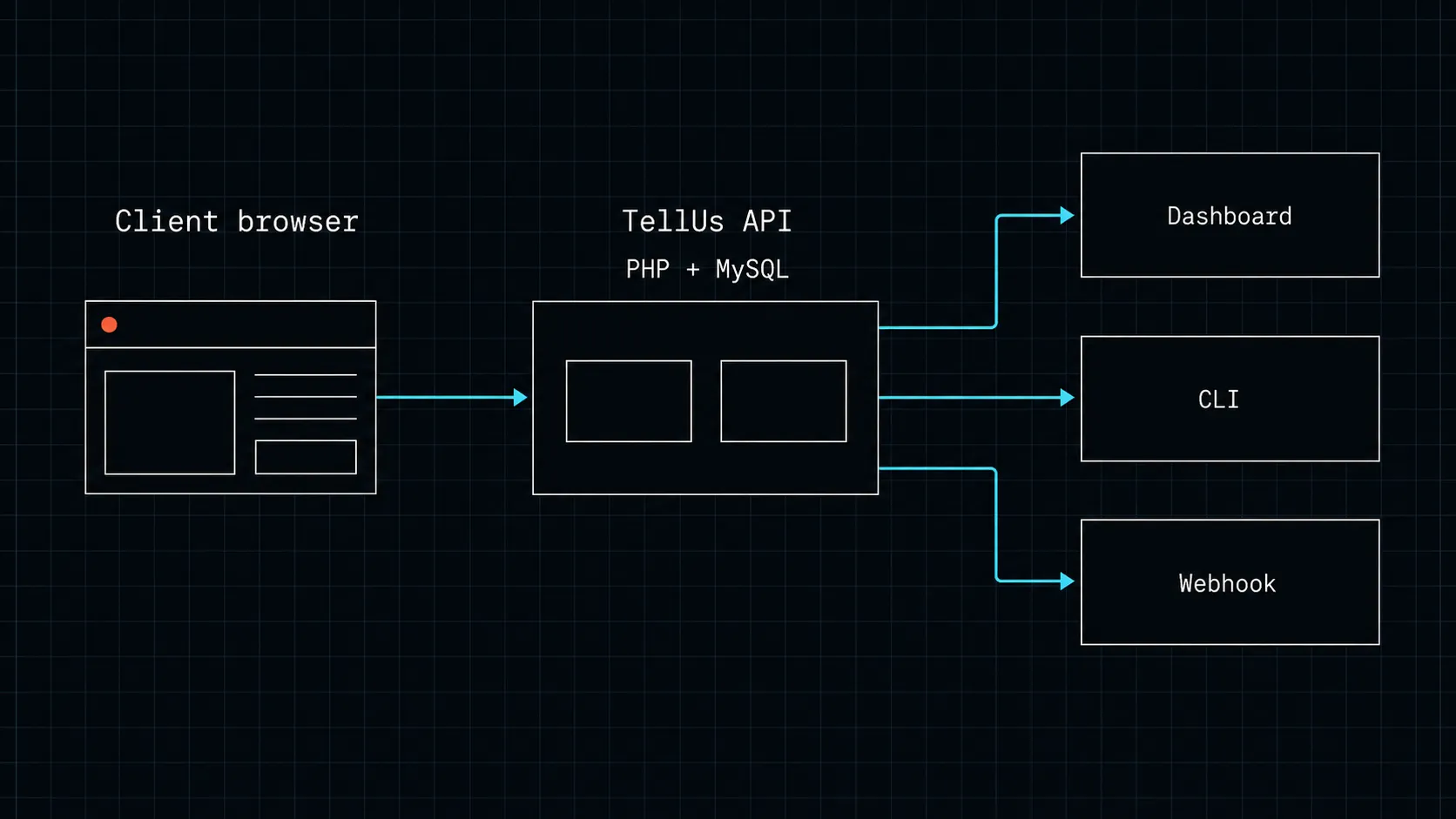
Architecture at a glance: client browser + widget → PHP/MySQL API → dashboard / CLI / webhook
No framework, no Composer. Shared-hosting compatible
Dashboard
Vanilla ES-module SPA
None
Served as static files; no bundler
Widget internals
The widget is compiled by esbuild into an IIFE bundle plus two optional lazy chunks. The core bundle contains activation detection, the UI shell, the element selector, and note submission. Screenshot and voice capture are not shipped to clients who never use them — they are fetched and evaluated on first use only.
Shadow DOM split
Widget chrome (floating button, panel, toast) renders inside a closed shadow root — isolated from host-page styles. The overlay layer (hover highlights, indicator dots) is a sibling element mounted on documentElement outside the shadow root. This split means overlay state survives SPA body-swaps. See ADR 004 for rationale.
Bundle budget
Chunk
What it contains
Size (gzip)
When loaded
Core widget
Activation, UI, selector, note submit
~10.5 KB
On ?tellus= activation
Screenshot chunk
html-to-image capture
~5.6 KB
First screenshot click
Voice chunk
MediaRecorder wrapper
~1 KB
First voice click
Hard budget: core ≤ 25,600 bytes gzip. Verify with bash scripts/check-bundle-size.sh.
API directory structure
repo root
api/# PHP API (procedural, PDO/MySQL, no framework)cli/feedback.php# Agent-facing CLI — progressive-disclosure DB queriesconfig.php# DB factory, constants, rate limits; bootstrapped firstindex.php# Front controller (.htaccess rewrites here)endpoints/# Route handlers: auth, sites, sessions, notes, reports, upload, mediamiddleware/# CORS (widget vs admin) + session authmodels/# DB helpers: site, session, notelib/webhook.php# Webhook dispatch + retrymigrations/# Numbered .sql files, applied by migrate.phpdashboard/# Vanilla HTML/JS SPA (ES modules, no build step)widget/# esbuild IIFE bundle + lazy chunkssrc/# Source modulesdist/# Built output — gitignored; must build before deploydocs/# ADRs, self-hosting guide, glossary, runbook
TellUs ships no per-site API keys and no bearer tokens. An earlier design spec included a data-key attribute — that model was never shipped. The live auth is Origin allow-list + admin cookie. See ADR 002 for rationale.
Widget trust: Origin allow-list
The widget embed is a plain <script> tag with no secret. When the widget submits a note, the API resolves trust by matching the HTTP_ORIGIN header against the sites.domain column in the database (api/middleware/cors.php → apply_widget_cors()). If the domain is registered, the request is accepted. No key to provision, rotate, or accidentally expose in source.
The practical consequence: a key in a <script> tag is not secret — anyone viewing source can read it — so API keys would add management overhead with no real protection. Origin-based trust gives equivalent assurance with a zero-secret embed.
Trust boundary
Trust is enforced by browser CORS, not a shared secret. Spoofing requires an Origin header that matches a registered domain — possible only from a browser context on that origin, or from a deliberately misconfigured request. This is the same trust model as most embedded third-party widgets.
Admin auth: HttpOnly session cookie
Dashboard login sets a tellus_admin HttpOnly session cookie (api/config.php → TELLUS_COOKIE_NAME). The cookie is not readable by JavaScript and fits a browser-only admin surface. Single-user admin model — one account, no roles, no multi-tenancy. There is no admin bearer token.
Surface
Auth mechanism
Secret in markup?
Widget → API (note submission)
Origin allow-list, CORS-enforced
No
Dashboard → API (admin)
tellus_admin HttpOnly cookie
No
CLI (server-side)
Direct DB access via PDO — no HTTP auth
N/A (server-side only)
04
Data model & selectors as agent targets
Every note is a structured capture of the clicked element's identity and visual state at annotation time. The data is designed for a coding agent — not a human reading a ticket.
Captured fields per note
Field
Type
Purpose
cssSelector
string
Primary agent target. Shortest unique selector via @medv/finder. What an agent passes to querySelector() or searches in source.
xpath
string
Structural XPath fallback — used when DOM structure is stable but class names change.
xpathText
string
Text-content XPath — third anchor for text-heavy elements where position and class differ.
textSnippet
string
Visible text of the element at annotation time, up to ~500 chars.
tagName
string
HTML tag name, e.g. H2, BUTTON.
elementId
string
The element's id attribute, if present.
classList
JSON array
All class names on the element at annotation time.
boundingBox
JSON object
Viewport-percentage coordinates: top, left, width, height. Used for positional disambiguation.
computedStyles
JSON object
Snapshot of fontSize, fontFamily, color, backgroundColor, padding, borderRadius, and more.
page
string
URL path of the page where the note was left.
viewport
string
Reviewer viewport dimensions, e.g. 1440×900.
browser / os
string
User agent parse — helps reproduce responsive or browser-specific issues.
screenshotUrl
string
Path to an optional screenshot captured at annotation time (Tier 2).
voiceTranscript
string
Transcription of an optional voice note (Tier 2).
The triple-anchor model
Each note stores three independent ways to re-locate the same DOM element: a CSS selector, a structural XPath, and a text-content XPath. An agent that can act on the CSS selector alone never needs the others. When a page refactor changes class names, the structural XPath still works. When position and class names both change but the text content is unique, the text XPath finds it. The triple-anchor system makes element location resilient to page evolution.
cssSelector ▸ .hero-section h2xpath ▸ /html/body/section[1]/div/h2computedStyles ▸ fontSize: 48pxreplacementText ▸ Smith Creative Studio
Note status flow
Every note moves through four states, supported by both the dashboard and the CLI:
open→told→resolved→archived
told means "acknowledged and communicated to the reviewer" — the status between open and resolved. Resolved notes can be reopened. Archived notes are hidden from the default dashboard view but remain in the database.
05
Two-layer report API
Feeding the full forensic payload of every note to an agent wastes context budget. Discarding detail means the agent can't self-serve when a summary is ambiguous. TellUs resolves this with a two-layer design: a sparse summary for bulk scanning, and a full detail endpoint queried only when needed.
Layer 1 — Summary
Endpoint:GET /api/reports/{domain}/summary
Optional query param: ?status=open (or told / resolved / archived). Defaults to all open notes. Returns ~250 bytes per note. An agent acting on most notes never touches Layer 2.
GET /api/reports/example.com/summary?status=open — response
Layer 1 fields per note: id, page, selector, currentText, comment, replacementText, type, detailRef. The detailRef is the handle an agent uses to request Layer 2.
Full forensic payload for one note. Queried only when the Layer 1 summary is insufficient to act — for example, disambiguating which .price element on a page with three. Returns the triple anchor (cssSelector, positional xpath, text-content xpathText), computed styles snapshot, bounding box, reviewer session context, screenshot URL, and voice transcript.
Agent protocol
Optimal agent workflow: ingest the Layer 1 summary and attempt to act on each note using only selector, comment, and replacementText. Query /detail/{noteId} only when a note is ambiguous. This keeps context budget low and avoids over-fetching on notes that are straightforward.
06
Embedding & activation
The embed snippet
Add one script tag to the site's HTML, once, before </body>:
embed — no API key, no configuration required
<!-- Add once to your site; no key, no configuration -->
<scriptdefersrc="https://tellus.alchemygraphics.com/widget/dist/tellus.min.js"></script>
No API key. No data-key. The widget is trusted because the site's domain is registered in the TellUs dashboard. Until ?tellus= appears in the URL, the script does nothing — it is completely dormant for production visitors.
Self-hosted instance override
To point the widget at a self-hosted TellUs instance instead of the public one, add data-tellus-api:
The widget activates only when a URL contains ?tellus= with a reviewer email address:
activation link
# Construct a link for the reviewer
https://yoursite.com?tellus=reviewer@email.com# Deactivate the widget for this session
https://yoursite.com?tellus=off
The email address becomes the webhook and notification target. A 24-hour session cookie persists activation across page navigations on the same site — the reviewer does not need to re-click the link to leave notes on a different page. ?tellus=off explicitly deactivates the widget for the current session.
The four gestures
Open the activation link
Reviewer receives the ?tellus=email URL. Widget activates silently; a floating button appears at the edge of the viewport.
Click any element
Reviewer hovers to highlight, clicks to select. The widget captures selector, XPath, text snippet, computed styles, and bounding box at click time.
Type a note
A compact panel opens beside the element. Reviewer types feedback — plain comment, replacement text, or both. Screenshot and voice are each one optional extra click.
Save
Note posts to the API. An indicator dot marks the element on-page. The dashboard and webhook receive the structured payload immediately.
07
CLI reference
The CLI is intended for developer and agent use. It queries the database directly on the server — no HTTP auth required. Run it via SSH against the deploy host.
php api/cli/feedback.php — example session
# Sparse scan — covers ~90% of use cases
php api/cli/feedback.php example.com

# Full detail for one note
php api/cli/feedback.php example.com --detail note-uuid-001

# JSON output for agent consumption
php api/cli/feedback.php example.com --json

# Status transitions
php api/cli/feedback.php example.com --told note-uuid-001
php api/cli/feedback.php example.com --resolve note-uuid-001 --comment "Fixed in header.php"
php api/cli/feedback.php example.com --reopen note-uuid-001

# Delete a note and its associated media
php api/cli/feedback.php example.com --delete note-uuid-001
Verb reference
Verb / flag
Argument
Effect
(no flag)
<domain>
Sparse scan — actionable fields for all open notes. Default first pass.
--detail
<noteId>
Full forensic payload for one note: triple anchor, computed styles, bounding box, session context, media paths.
--json
—
Output as machine-readable JSON instead of formatted text. Combine with the default scan or any other flag.
--told
<noteId>
Transition note to told — acknowledged / communicated to reviewer.
--resolve
<noteId>
Transition note to resolved. Pair with --comment to record the fix reference.
--comment
"..."
Resolution comment — used with --resolve. E.g. "Fixed in commit abc123".
--reopen
<noteId>
Revert a resolved note back to open.
--delete
<noteId>
Permanently delete the note and any associated media (screenshot, voice file) from disk.
Agent integration pattern
Optimal pattern: run the sparse scan with --json, feed Layer 1 JSON to your agent, execute changes, then call --resolve with a commit reference for each completed note. Query --detail only for notes the agent flags as ambiguous.
08
Self-hosting
TellUs is MIT-licensed and designed to run on plain shared hosting. No Docker, no Composer, no framework. A competent PHP developer can be running their own instance in under an hour.
Prerequisites
Requirement
Minimum
Notes
PHP
8.0+
Uses str_starts_with, arrow fn(), union types
MySQL / MariaDB
MySQL 5.7+ / MariaDB 10.3+
JSON column support required
Web server
Apache or Nginx
Must support URL rewrites (.htaccess or equivalent)
Node.js + npm
Any current LTS
Widget build only — not needed at runtime
Shell access
Required
For migrations, admin setup, and CLI use
Setup sequence
Configure the API
Copy api/config.local.example.php → api/config.local.php. Fill in DB credentials and set TELLUS_BASE_URL to the public-facing root of your instance (no trailing slash).
Run migrations
php api/migrate.php — applies numbered .sql files in order. Safe to re-run; already-applied migrations are skipped. Run again after any upgrade that adds a migration.
Create the first admin
php api/setup-admin.php <username> <password> — single-user admin model. Store the credential in a password manager; there is no password-reset flow in the UI.
Build the widget
cd widget && npm install && npm run build — produces widget/dist/tellus.min.js and the lazy chunks. The dist/ directory is gitignored; a clean checkout has no bundle.
Deploy & verify
Transfer files to your server, excluding api/config.local.php, uploads/, node_modules/, and .git/. Then verify with curl https://your-host/api/health — expected response: {"data":{"status":"ok"}}.
Before you deploy
Make uploads/ writable by the web server process and ensure it is not publicly listable (Options -Indexes in an .htaccess there, or equivalent server config). Do not use --delete on routine rsync deploys — it can remove uploaded media and runtime-generated files.
Full guide
This section is a condensed reference. The complete cold-install walkthrough — including database creation SQL, Apache/Nginx rewrite config, post-deploy checklist, and troubleshooting — is in docs/self-hosting.md.
09
Feature tiers & roadmap
TellUs is built progressively. Tiers 0–2 are shipped and available now. Tier 3 is on the roadmap.
Tier
Label
Features
Status
0
Core
URL activation, widget, element selector, comment input, note indicator dots
TellUs is MIT licensed. You can run it on your own server, fork it, and modify it freely. No SaaS subscription. No vendor lock-in. The only cost is your own hosting.
MIT — permissive open source
Use TellUs in commercial projects. Self-host for clients. Fork and extend freely. Attribution appreciated but not required. See LICENSE for the full text.